
November 20, 2025
Bliss Sampler 3.5 released
We're excited to announce the release of Bliss 3.5, featuring 8x oversampling for pristine audio quality, enhanced macro management with bank-wide operations, professional octave display, refined user interface with modern pill-shaped styling, and comprehensive improvements to SFZ import/export and overall stability.
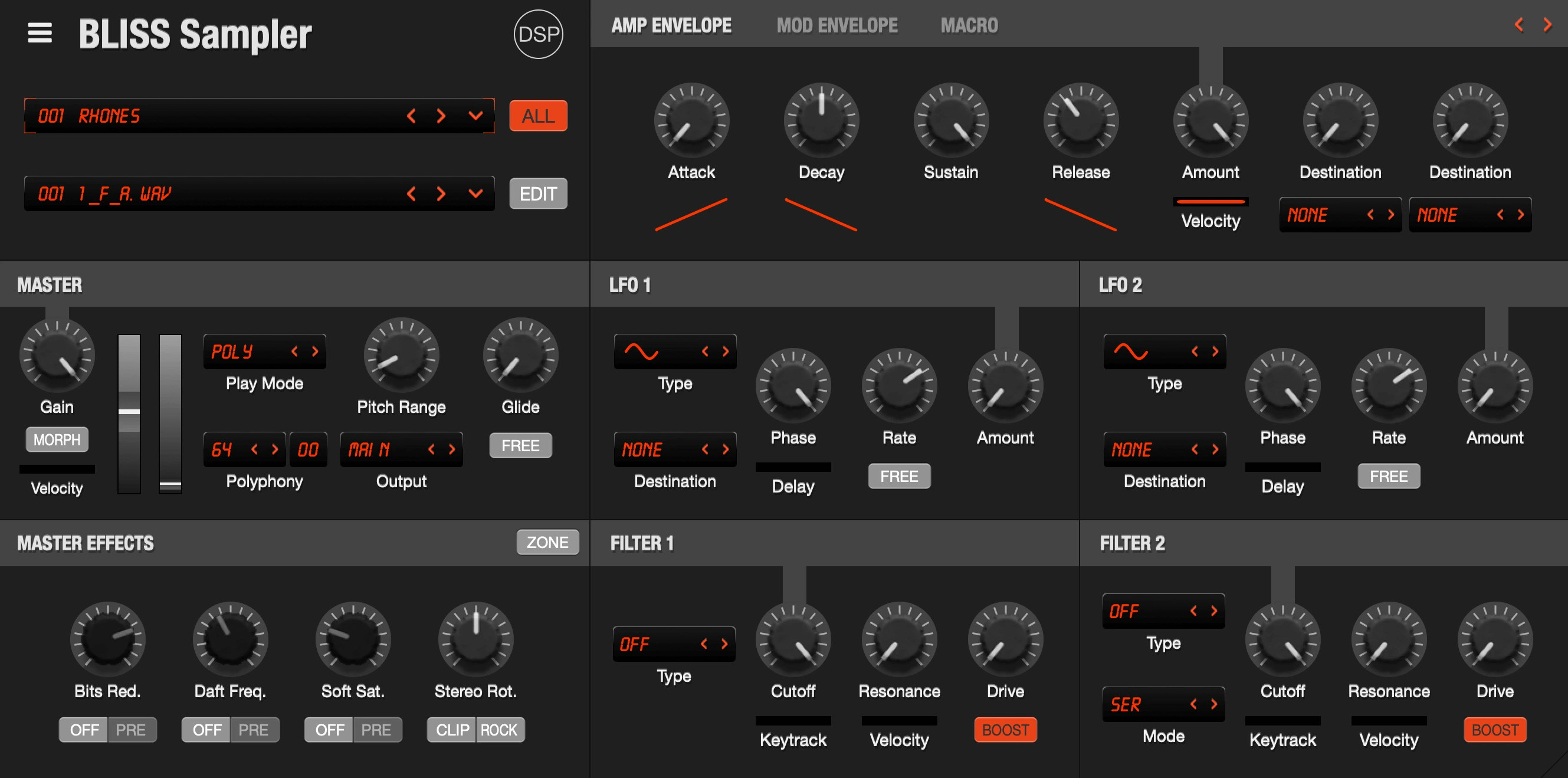
8x Oversampling for Effects
- Professional-quality oversampling using high-quality half-band FIR filters eliminates aliasing from distortion and nonlinear effects.
- Applied to saturator, compressor, soft clipper, phaser, chorus, reverb, and bits reducer for dramatically improved audio quality.
- Delay processes at base rate for accurate tempo sync maintaining musical timing precision.
- Transparent processing with zero CPU overhead delivering pristine sound quality.
Enhanced Macro System
- Reorganized Copy and Paste menus with clearer workflow and better organization for efficient macro management.
- Added "All to Bank" paste option to apply macro settings across all 128 programs simultaneously for instant sound design across entire banks.
- Preserves individual macro names when pasting maintaining your custom labeling and organization.
- Streamlined menu structure with logical grouping of macro operations.
Macro Presets System
- Save and load all 8 macro configurations as program presets for instant recall of complete modulation setups.
- Save and load individual macro configurations to any macro slot enabling flexible modulation template creation.
- Copy settings between macro slots with macro copy/paste functionality for rapid workflow optimization.
- Copy/paste all macros at once for efficient workflow when building similar patches.
- Reset all macro settings to default state with single click for quick initialization.
- "Open Macro Folder" command for quick access to saved macro presets and custom templates.
Standard DAW Octave Display
- Fixed note display to match industry standard where middle C = C4 eliminating confusion when working across different DAWs.
- Eliminates the confusing 2-octave offset when sampling VST3 plugins ensuring accurate MIDI note mapping.
- Updated keyboard labels and sampling range displays throughout for consistent visual feedback.
- Extended full MIDI range to G8 (127) for complete coverage of the MIDI specification.
- All existing projects remain fully compatible with automatic internal conversion.
Refined User Interface
- Modern pill-shaped buttons and text fields throughout the interface providing contemporary aesthetics.
- Improved text selection colors with better contrast using Windows blue background and white text for enhanced readability.
- Better visual separation between sliders and toggle buttons in sampling dialog improving clarity during session setup.
- Circular button styling in macro editor for polished professional appearance.
- IBeam cursor in sample editor waveform for more precise editing and sample selection.
- Recent instruments appear directly in main menu when no plugin loaded for faster access to frequently used instruments.
- Added horizontal padding to macro name editor for improved pill-shaped appearance.
- Square buttons made circular in macro editor for consistent visual design.
MIDI CC Configuration Enhancement
- Clickable MIDI CC label in Macro Editor for easy configuration without menu navigation.
- Dedicated dialog to set MIDI CC numbers (0-127) for each macro providing precise control assignment.
- Streamlined workflow for hardware controller integration.
Effects Preset Interface
- Added dropdown buttons to CHORUS, DELAY, and REVERB sections for quick preset access.
- Clickable effect labels for easier access to preset menus streamlining sound design workflow.
- Intuitive preset management integrated directly into effect sections.
New Sample Loading Workflow Option
- Added "Create zone on sample load" option in Settings for customizable default behavior.
- Choose your preferred workflow: replace current zone or create new zone by default.
- Hold Shift to temporarily reverse the behavior for flexible on-the-fly adjustments.
- Works consistently across all sample loading sources including Sample Library, Recent Samples, and Last Opened Folder menus.
Improved SFZ Import/Export
- Fixed AMPEG envelope parameters (attack, decay, sustain, release) now properly imported from SFZ files.
- Correct hierarchical parsing of global, group, and region settings following SFZ specification.
- Settings properly cascade from global to group to region level maintaining proper parameter inheritance.
- Better handling of programs with corrupted or missing samples with graceful error recovery.
- Added support for
section parsing in SFZ files. - Implemented hierarchical settings inheritance (global > group > region) following SFZ standards.
Performance Optimizations
- Drastically reduced SFZ sample loading times from minutes to seconds with intelligent path lookup.
- Optimized sample loading for banks with full sample paths, especially beneficial on Linux systems.
- System now prioritizes exact path lookups before extensive directory searching for faster load times.
Bank Loading & External Sources
- Improved handling of external sample sources (SFZ, EXS, SF2) during bank loading with better compatibility.
- User parameter modifications (envelopes, filters, etc.) preserved when samples are external maintaining your customizations.
- Corrected internal logic for setting and preserving source file paths within banks ensuring reliable sample references.
User Interface & Experience
- Changed file storage locations on macOS to ~/Library/Application Support/discoDSP/Bliss/ for better system integration.
- Prevents unnecessary permission dialogs on macOS streamlining the user experience.
- Windows and Linux continue using Documents folder maintaining familiar file locations.
- Fixed HiDPI scaling issues with license dialogs on Windows for proper display on high-resolution monitors.
- Implemented library menu cache clearing system ensuring changes to library folders are immediately reflected in menus.
- Removed demo version restrictions from sample library popup menus for consistent interface across versions.
Enhanced Stability & Reliability
- Fixed crashes when exporting SFZ files with missing zone data through comprehensive validation.
- Improved memory allocation safety with proper error handling and exception-safe allocation.
- Fixed race conditions when loading zones from ZIP archives in parallel ensuring reliable multi-threaded loading.
- Fixed audio format detection issues for FLAC files in ZIP containers with proper stream positioning.
- Better error messages showing which zones failed and why for streamlined troubleshooting.
- Added null safety checks throughout to prevent crashes with missing samples.
- Enhanced error logging for missing sample files with specific file paths and zone information.
- Fixed EBL audio format reader to always reset stream position on failure preventing format detection issues.
- Added comprehensive validation in BLISS_ZONE::alloc_wave() with try/catch block and proper cleanup on allocation failure.
Linux Stability Fixes
- Resolved crashes when loading SFZ files from background threads during bank loading.
- Fixed crash when adding macro links with improved null pointer checks for enhanced reliability.
This update is free for existing Bliss 2.x, 3.x customers and available now in AAX, AU, VST2, VST3, and standalone formats for Windows, macOS, and Linux. Visit our Bliss product page for download information and complete documentation.
November 1, 2025
Vertigo 5.0 released
We're excited to announce Vertigo 5, a major update featuring doubled operator count, enhanced sound design tools, comprehensive audio import capabilities, and a completely redesigned interface.
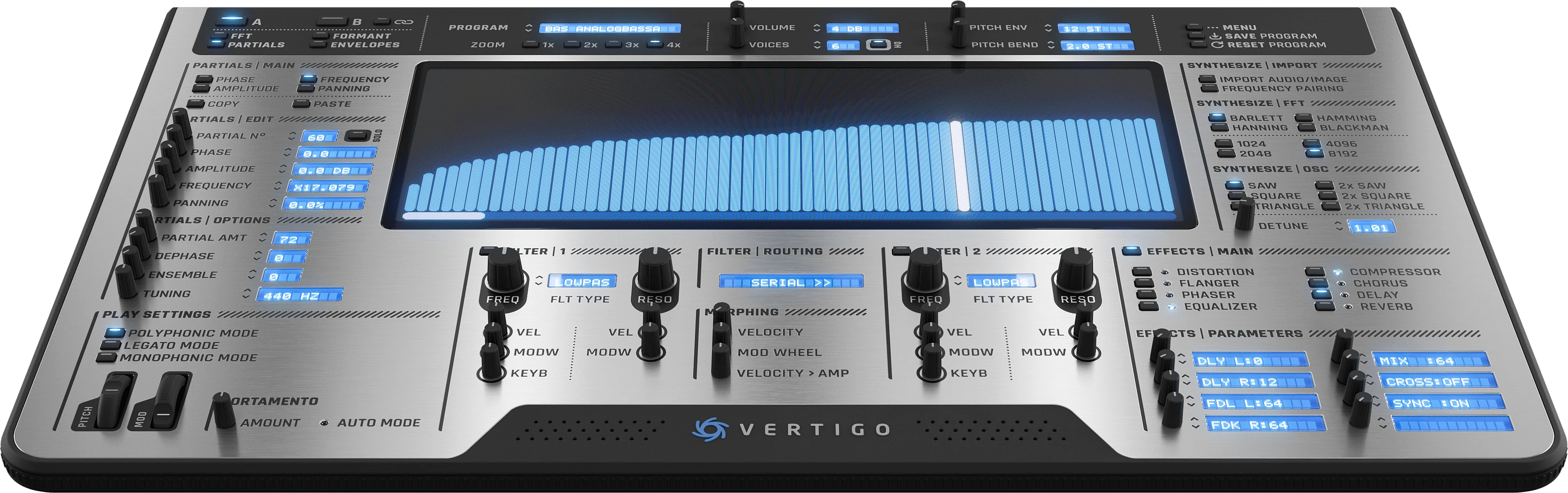
Vertigo is a powerful additive synthesizer offering unprecedented control over harmonic content with advanced FFT re-synthesis, micro-tuning support, and professional sound design capabilities.
Version 5 represents the most significant update in Vertigo's history, delivering professional-grade tools for advanced sound design and composition.
What's New
- Enhanced Sound Design : Doubled operator count from 256 to 512 for richer, more complex timbres and textures. New generation zero-delay feedback filters with enhanced sonic quality. 8x oversampling distortion for professional-grade saturation and warmth. Improved reverb algorithm for more realistic spatial effects. Enhanced noise generation for cleaner, more musical results.
- Audio Import & Re-synthesis : Added MP3 and M4A file import support alongside existing WAV/AIFF formats. Automatic FFT re-synthesis with comprehensive safety controls for instant additive conversion. Enhanced loop point detection supporting embedded markers in audio files. Import settings are now remembered between sessions for faster workflow.
- Micro-Tuning Support : Full MTS-ESP integration for advanced micro-tuning and alternative scales. Per-note tuning support via MTS-ESP protocol. Visual feedback showing active tuning status in the menu system.
- Interface Improvements : Completely redesigned 3D render skin built from scratch for a modern, professional aesthetic. Modernized visual design with transparent display backgrounds and anti-aliased drawing. Pill-shaped controls and scrollbars for a contemporary look. Larger envelope points with improved visibility and curve rendering. Formant editor now displays frequency and gain values on mouse hover. Expanded click areas on effects toggles for easier interaction. Mouse wheel support added to all knobs and partial editing controls. Partials auto-select on hover with 500ms drag delay to prevent accidental edits. Interface scaling from 100% to 200% with automatic screen resolution detection.
- Preset & Bank Management : Comprehensive popup menu system with program and bank operations. Quick save to any bank with automatic program naming. Native macOS menu integration for improved performance. Create, rename, export, and delete banks directly from the interface. Fast multithreaded preset compression for smaller file sizes. All presets from previous versions remain fully compatible.
- Workflow Enhancements : Shift+Click to reset filters, effects, and partial parameters to neutral defaults. Default envelope mode changed to Amplitude for more intuitive sound design. More descriptive 6-character filter type names (LowPas, HiPass, BndPs1, BndPs2, Notch, Peak). FFT import options with detailed window type descriptions. All UI settings and sizes are saved and restored automatically. Independent zoom controls for partials, envelope, and spectral views.
- Performance Optimizations : Platform-specific SIMD acceleration (AVX2/NEON) for oscillator engine. Fused multiply-add (FMA) optimizations throughout the DSP chain. Optimized FFT transforms with platform-specific vectorization. Faster audio import analysis and processing. Complete effects processing architecture optimization.
- Licensing System : Secure online license activation with instant validation. Modernized licensing system for all plugin formats.
Vertigo is available for macOS (Universal Binary 2 with Intel and Apple Silicon support), Windows, and Linux across multiple formats including Standalone, AAX, AU, VST, VST3. This update costs $49 for previous Vertigo customers.


