Blub is a modular tracker for the Mac in the tradition of Jeskola Buzz. Every instrument and effect is a machine on a canvas: pull a cable from a synth into a delay, from the delay into Master, and you hear it. Each machine gets its own tracker patterns, and the song sequence lines them up into a track.
Any AU or VST3 plugin on your Mac can be a machine, wired next to the built-in ones: a 303-style Bassliner, a Devil Fish modelled on a real unit, a drum machine, an arpeggiator, LFOs and Valeria Tracker, a sample tracker ported from Matilde Tracker. Old Buzz songs open with their patterns, sequence and waves.
When the track is done, export it to AAC or WAV, or hand it to Ableton Live, Bitwig Studio, REAPER or FL Studio as stems and MIDI tracks. Claude and ChatGPT can work on the open song through the built-in MCP server.
Machines and Cables
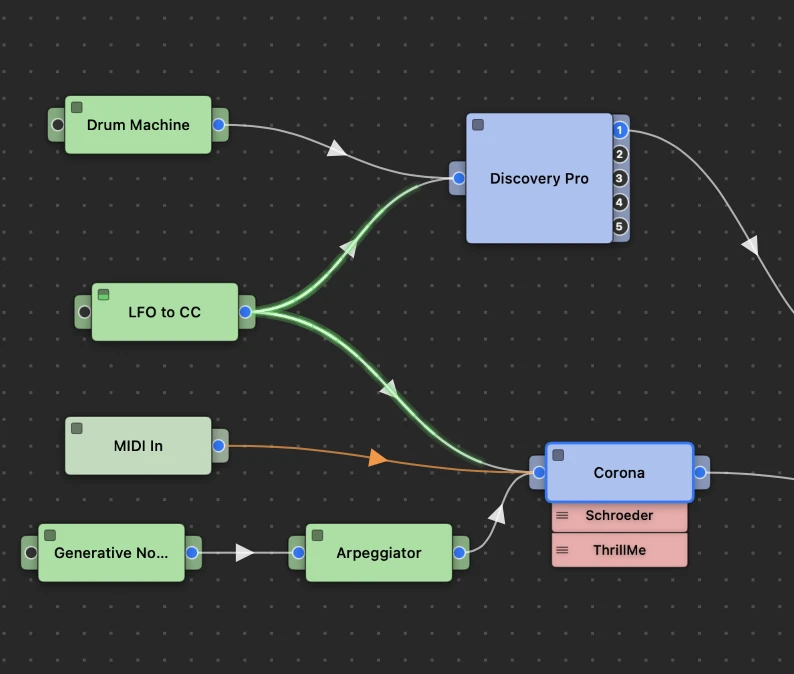
Generators, effects and MIDI machines are placed on a zoomable canvas and wired together by dragging cables between ports.
- AU and VST3 hosting: plugins with multiple outputs and sidechain inputs get one port per bus. A song that uses a plugin you don't have keeps its settings, and Reload Plugin brings it back once it is installed
- Insert effects: a chain of effects on each machine and on the master, with presets, copy and paste
- Duplicate: copies a machine with its inserts, state, patterns, automation lanes and cables
- Plugin delay compensation across the whole graph. Machines that don't feed each other render in parallel on the performance cores
- Selection and groups: drag a rectangle on the canvas to select several machines and move them together, and group machines under a name so they select and move as one
- Templates: save a song, or a few machines with their cables, patterns and inserts, as a template. Open one as a new song or add its machines to the current song
- Cable distortion: every audio cable has a volume fader and a distortion stage. Pick Neve (class-A transistor stage and output transformer, fitted to the 1073 specifications), SSL (5534 bus amplifier), soft and tube curves, clip, fold, wrap, crush and more, and drag for the drive. It runs at 4x oversampling while playing and 16x when exporting, with its latency compensated
Built-in Machines
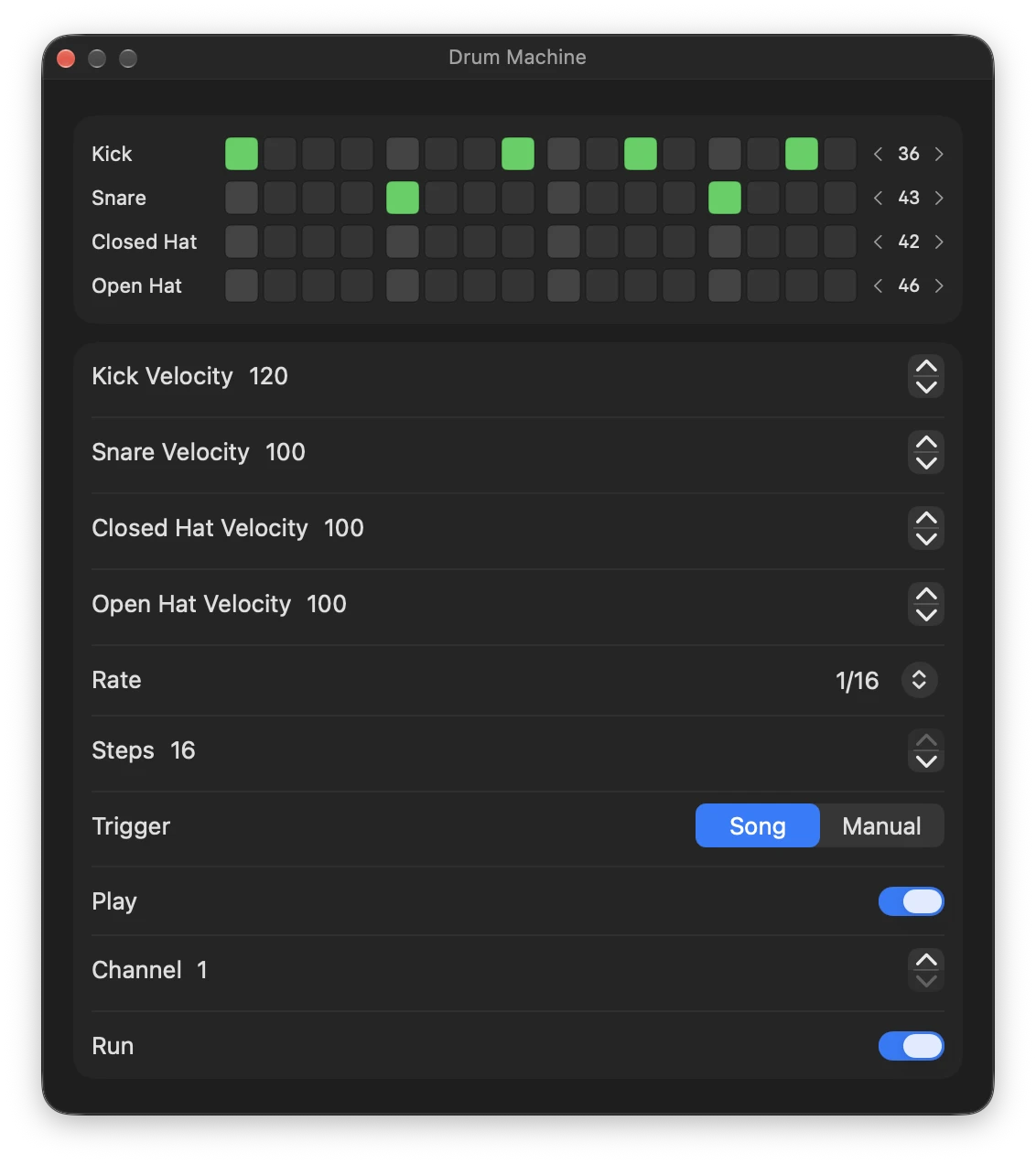
The MIDI machines follow the song tempo, and keep running on their own clock when the transport is stopped so they can be played live.
- Arpeggiator: up, down, up and down, random or as played, with octaves, gate and latch
- Drum Machine: a 16 step, 4 voice step sequencer for kick, snare and hats that sends MIDI or plays wavetable waves, with pitch, hi-hat choke and flams
- Simple Generative: random notes from a scale with density and velocity range, started by the song, by hand or by held notes
- LFO: up to eight sine, triangle, saw, square and sample and hold LFOs, each sent as MIDI CC or moving a parameter of a machine it is wired to
- Automation: drives plugin parameters through macro bindings
- Valeria Tracker: a sample tracker ported from Matilde Tracker, with per-track outputs, a song wavetable and time stretch
- Wave Pool: plays a wave from the wavetable from its start at its own pitch, like an audio clip. Drop audio files on the canvas or on its sequence column and each one becomes a pattern as long as the file, drawn as a waveform in the sequence, where blocks can be dragged and resized. Offset and Cue columns start a wave from any point or slice
- MIDI Tracker: sequences AU and VST3 instruments and hardware synths from tracker patterns, with transpose and octave. It loads the midi.guide CC maps, so its panel names the device's controls, follows its knobs and adds a pattern column for a control with a right-click
- Swing: 8th or 16th swing for the whole song or a single machine, set by its cable, with grooves modeled on the MPC, TR-808 and TR-909, LinnDrum, SP-1200 and Ableton swing
- discoDSP generators: Bassliner, a 303-style bassline with slide and accent; Basic, a bass synth with up to eight voices; and Kick, with XP and Classic models
- discoDSP effects: SV Filter, a 2-pole state variable filter with low pass, notch, high pass and band pass, stereo width and phase; Cross Delay with ping-pong, Ninja Delay, PhatMan chorus, Phaser, 2P Filter, Saturator, StereoDist, Panzer Delay and EQ-3 XP. Imported Buzz songs use them in place of the Buzz machines they match
- MIDI Input, MIDI Out, Audio In and Audio Out: connect hardware and audio devices to the graph. MIDI Out can send MIDI clock with song position, and Audio In measures the round trip through a hardware synth and compensates for it
Patterns and Sequence
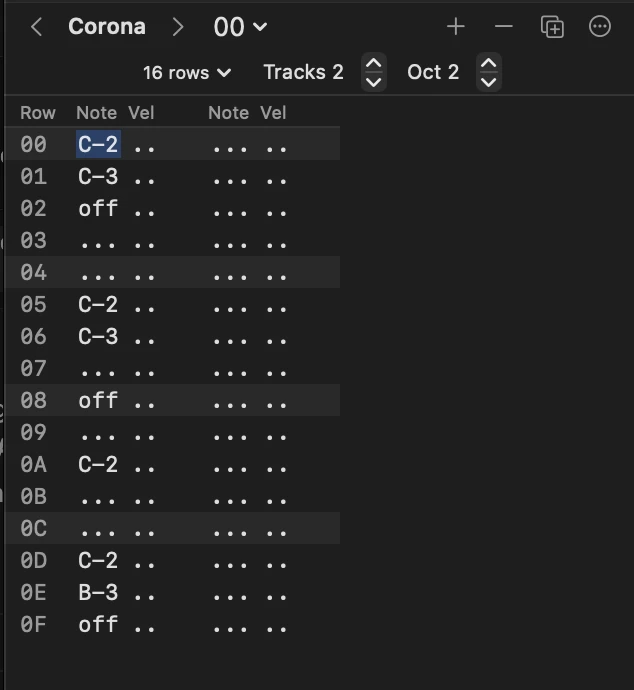
Patterns are edited in a tracker view with note, velocity, parameter and trigger columns, using the FT2 keyboard layout.
- Sequence: one key per pattern, Buzz style, with a loop range, play from cursor and automation lanes with step values or curves
- Views: all machines, only generators, effects or MSG machines, or a single machine. A filter switch hides the machines that have no blocks or automation
- Pattern blocks: double-click a block to open it, or right-click it to duplicate, repeat or make it unique
- Curves: points can be added, moved and removed with the mouse
- Recording: while the song plays, knob moves are written into the patterns playing and notes from a MIDI keyboard into the pattern being edited. MIDI Learn binds a MIDI controller to any machine parameter
- Pattern tools: transpose, randomize, interpolate, humanize, expand and shrink a selection
Wavetable and Sample Editor
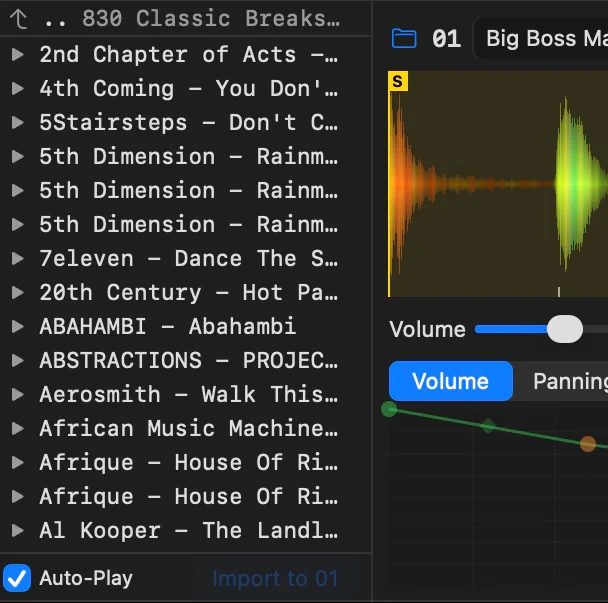
The song's wavetable holds 200 waves for Valeria Tracker, Wave Pool and the Drum Machine. Each wave is drawn with its spectrum in color and a tick at every transient.
- Sample editing: cut, copy, paste, crop, normalize, fades, gain, reverse, invert, DC offset removal, silence and mono conversion, from the Edit menu, a right-click or a long press on the waveform
- Snap: selections, the cursor and the loop handles snap to transients or zero crossings, so cuts and loops don't click
- Envelopes: volume, panning and pitch envelopes with a grid, spline or bent segments and presets such as gates, pumping and LFOs
- Sample browser: browse folders of samples, preview them from the keyboard and import several files into the wave slots at once
- REX2 loops and sample libraries: REX2 files load with their slices as cues, and a sliced wave dropped on Valeria Tracker becomes a pattern that plays each slice. The browser opens Akai S1000/S3000 disk images, Buzz songs and MOD files like folders
- Levels: a wave can hold several samples, each played by the notes nearest its root note. Buzz songs import with their levels
- Every edit and import is one undo step
Mixer and Master
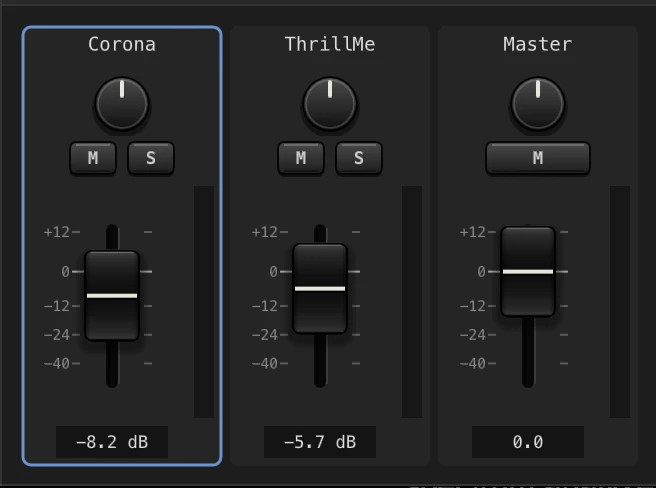
Each machine has a mixer strip with volume, pan, mute, solo and VU meters with peak hold and clip lights. The master track has automatable volume and pan, a spectrum analyzer and a goniometer.
AI Agents
Blub includes an MCP server, so AI agents such as Claude and ChatGPT (Codex) can work on the open song. Agents are off until you turn them on in the AI menu.
- Song editing: add and wire machines, write patterns and the sequence, set the mixer and automation
- Audio: slice samples, listen to renders and export audio
- Tuning: measure the pitch of kicks and basses, read the key and tempo of a sample and tune waves to each other
- Setup: AI > Connect To sets up Claude Desktop, ChatGPT, Cursor and VS Code in one step, and AI > Copy Setup For covers Claude Code and other clients
- Undo: every change the agent makes is one undo step
Songs and Export
Songs save every machine, cable, pattern and plugin state in one file, with plugin states compressed. Undo and redo cover every change. Buzz (.bmx), ProTracker (.mod), FastTracker II (.xm) and Impulse Tracker (.it) songs can be imported.
The whole song or the loop range can be exported to 256 kbps AAC, or with a license to 32-bit float WAV. The realtime recorder writes the master and each mixer channel to separate WAV files, with start on play and auto stop on silence.
Song to Stems renders every mixer channel to its own WAV and writes projects for DAWproject (Bitwig Studio, Studio One, Cubase), Ableton Live 12, REAPER and FL Studio. The stems sit on the song tempo and are split into clips where they go silent. Each generator also comes as a MIDI track with its notes and automation, and in DAWproject with its AU or VST3 plugin and preset.
System Requirements
 macOS Sonoma 14.0+. Apple Silicon or Intel.
Blub checks for updates on its own from the Blub menu.


