
September 22, 2026
Retromulator 1.7 released
Retromulator is a multi-core retro hardware emulation plugin running original firmware on cycle-accurate CPU and DSP emulation.
Version 1.7 adds two new hardware cores, the Roland Sound Canvas GS modules and a four-format module Tracker, plus host automation for every core, MIDI file and module playback, and offline rendering to WAV or MP3.
88emu Roland Sound Canvas Core
- Bit exact emulation of Roland SC-88, SC-88VL, SC-88Pro, SC-8850 and SC-55mkII, the GS modules behind a generation of MIDI files.
- Original firmware boots on emulated H8/500 and SH-2 CPU cores with the GP, LSP and XP custom chips, using x86 and ARM64 JIT backends.
- Drum kit and tone names are read from the board ROM, and the selected board is stored in the session, so reloading a project boots the module it was written with.
- MIDI song player: standard MIDI files play through the board selected in the bank combo, with the song name and a 16-channel activity meter on the LCDs, and the transport exposed as a host parameter.
- GS tone and drum kit names are shown for variation banks instead of raw bank numbers.
Tracker Core
- Plays XM, MOD, S3M and IT modules. XM and MOD play through the Fasttracker 2 replayer, S3M and IT through the Schism Tracker player, with Nuked OPL3 handling Adlib instruments.
- The program combo lists the song positions, the nav pill becomes play and stop, and the 16-column meter shows the mixed audio of each channel.
- MIDI note transport: C0 restarts the song, D0 stops it, C#0 and D#0 step through the playlist, and note 24 + n starts at position n. Keyboard control with space, left, right, up and down.
- Tempo can follow the host playhead or incoming MIDI clock.
- Playlists from several files, a dropped folder scanned recursively, or an .m3u / .m3u8 file, with Import Playlist and Export Playlist. The playlist and its current entry are stored in the session, and songs advance with the editor closed.
Host Automation And Rendering
- Every core exposes a fixed pool of 128 host parameters with permanent IDs, rebound per core on each synth swap. The count and the IDs never change, which is what AU, VST3 and AAX require for saved automation to survive a reload.
- Sound Canvas songs and Tracker modules render offline to WAV or MP3 320. Tracker bounce uses high quality SINC256 resampling for alias-free mixes.
- Render Playlist writes every Tracker entry into a folder in playlist order.
- Command line rendering in the standalone build with --render, --board, --rom, --out and --format, plus --list-boards and --list-tones for the 88emu tone and drum kit tables.
- File associations in the standalone app: modules, playlists and folders open in the Tracker core, MIDI files in the Sound Canvas core. Several modules dropped at once become a playlist, and drops on the macOS dock icon work.
This update is free for all Retromulator 1.x customers. Retromulator is available for Windows, macOS and Linux in AAX, AU, VST3 and standalone formats, and on iOS.
September 14, 2026
Discovery Pro 9.4, Bliss 3.23, OPL 3.1, FX 3.14
Four updates are out. Discovery Pro loads Nord Sample Library files and plays stereo waves in stereo, Bliss imports sfArk and ReCycle REX, OPL gains an AN1x-style unison, and ThrillMe gets five saturation circuits per band.
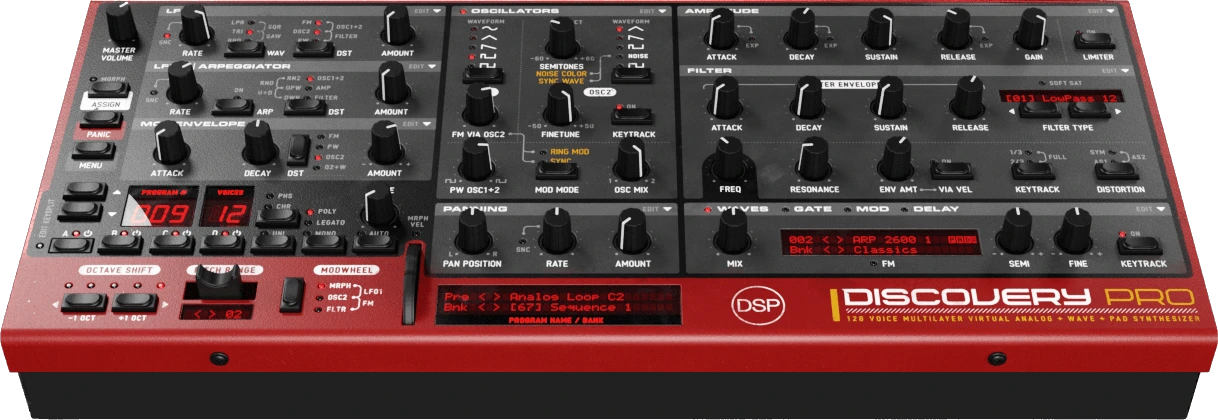
Discovery Pro is a virtual analog synthesizer and sampler with 4 layers, 12 oscillators, 16 filter types including Nord Lead 2, Moog Ladder and Oberheim SEM models, SFZ/WAV/SoundFont/DWB/Bliss and Nord Sample Library support, PADsynth re-synthesis and Nord Lead 2 SysEx import/export.
Version 9.4 loads Nord Sample Library files (.nsmp, .nsmp3 and .nsmp4) and introduces the Wave Stereo Engine.
This update is free for all Discovery Pro 9.x customers. Discovery Pro is available for Windows, macOS and Linux in VST, VST3, AU and standalone formats.
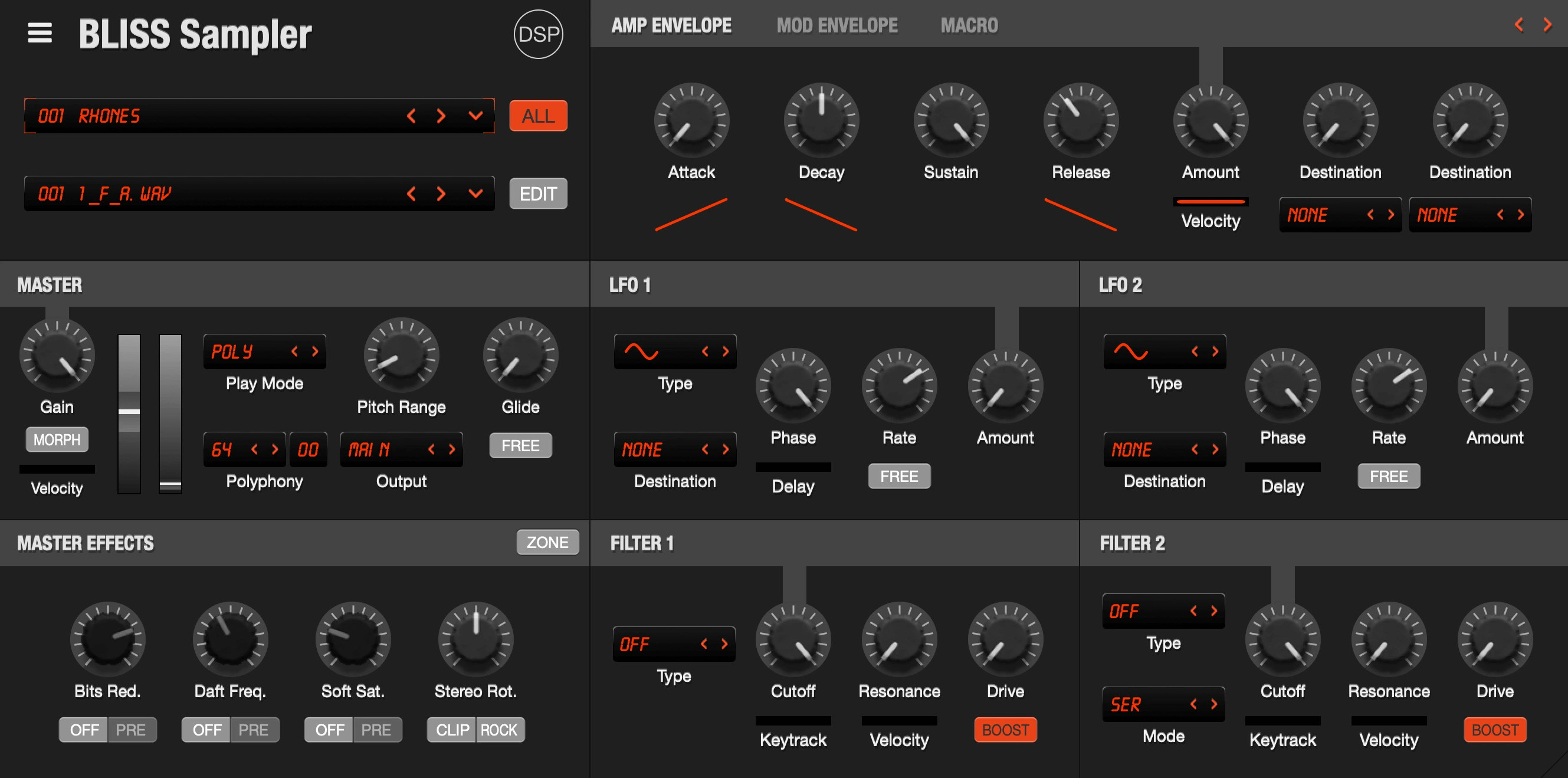
Bliss is a professional sampler with VST/AU and hardware instrument recording capabilities, Visual Key Mapper, built-in wave editor, and comprehensive format support including AKAI S1000/S3000/S5000/S6000, NKI, EXS, SFZ, SoundFont2, and CD-ROM disk images.
Version 3.23 adds sfArk and ReCycle REX import, REX export, and fixes slice timing in MIDI file export.
This update is free for all Bliss 2.x and 3.x customers.
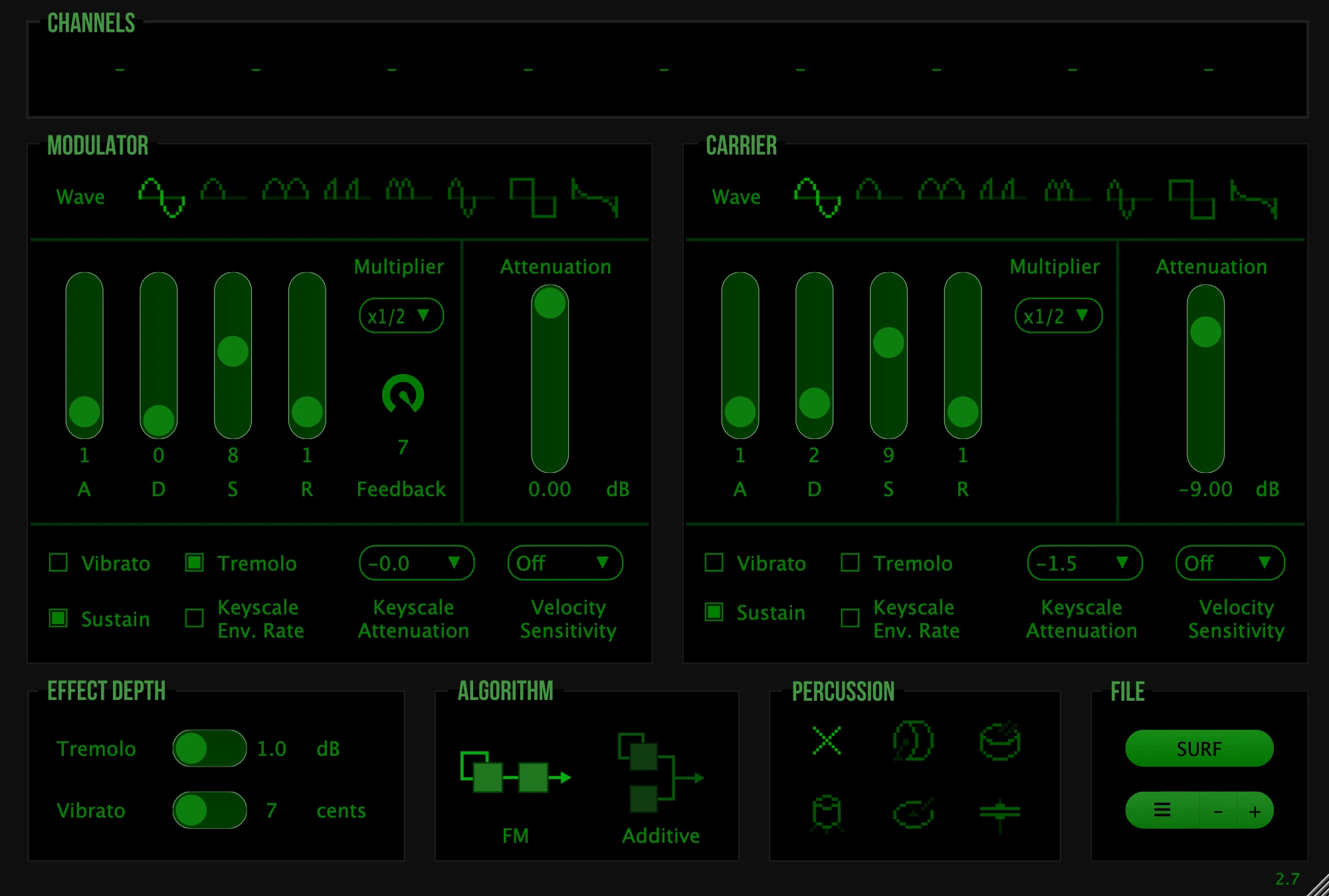
OPL emulates the Yamaha OPL2 (1985), the FM chip behind AdLib and Sound Blaster game soundtracks of the late 80s and early 90s. Two-operator FM with eight waveforms per operator, OPL2 percussion mode, partial OPL3 features, 16x oversampling, 2000+ presets and SBI import.
Version 3.1 adds a Unison control modeled on the Yamaha AN1x and renders the chip output in stereo.
This update is free for all OPL 3.x customers.
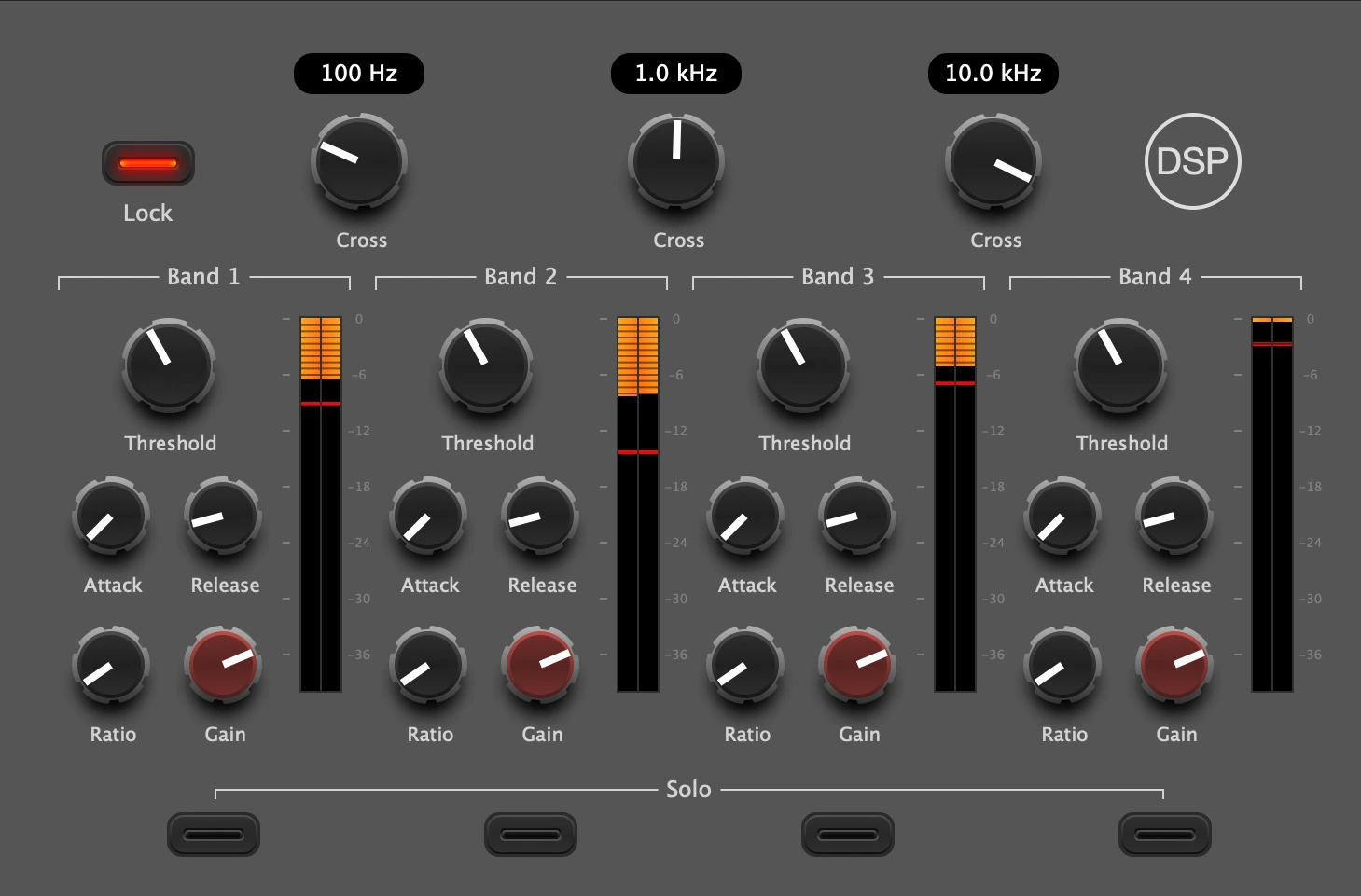
ThrillMe is a four-band compressor with a Lock control that ties parameters across bands, so you dial in one band's attack and release and snap the rest to it instead of setting twelve knobs by hand. Part of the discoDSP FX Bundle and available for iOS as an AUv3.
Version 3.13 replaces the per-band saturate/clip switch with five circuits: Clean (dynamics only), Tape (symmetric tanh, odd harmonics), Tube (the previous asymmetric saturator, still the default), Soft (cubic soft clipper with unity small-signal gain) and Clip (hard clip at the oversampled rate), adds circuit pills with modifier clicks, consolidated joined groups, knob scales and 21 new presets. Existing sessions, presets and automation load unchanged.
ThrillMe 3.13 ships with discoDSP FX Bundle 3.14. The update is free for all FX Bundle customers.
September 7, 2026
Discovery Pro 9.3, Schroeder 3.0 released
Discovery Pro 9.3 and Schroeder 3.0 are out. Discovery Pro gains per-voice LFOs with key tracking and envelope links, an arpeggiator latch, a Retro oscillator engine and musical tempo sync divisions. Schroeder is rewritten with seven reverb spaces, four variations and surround support.
Discovery Pro is a virtual analog synthesizer and sampler with 4 layers, 12 oscillators, 16 filter types including Nord Lead 2, Moog Ladder and Oberheim SEM models, SFZ/WAV/SoundFont support, PADsynth re-synthesis and Nord Lead 2 SysEx import/export.
Version 9.3 adds LFO key tracking, Mod Env to LFO rate links, an arpeggiator latch, a Retro oscillator engine and status pills that show what each LFO is doing. Synced rates now step through a grid of musical divisions.
What's New
- LFO Key Tracking: In the LFO 1 or LFO 2 Edit menu set Key Tracking to Off, Half, Full, Double, Invert or a custom percent from -200 to 200. The LFO rate follows the note you play, relative to C3. With tracking on, every voice gets its own LFO with its own phase and its own Poly AT or MPE pressure, so chords shimmer instead of moving as one block. Off keeps the shared per-layer LFO, so older patches sound the same. Ignored while the LFO is synced to the host clock.
- Mod Env to LFO Rate Links: In the Mod Env Edit menu pick Link to LFO 1 Rate or Link to LFO 2 Rate, with a positive or negative amount up to 100 or a custom value. The envelope sweeps that LFO's rate on every note. The LFO runs per voice while a link is active, and links stack with key tracking. The Mod Env header shows the active links.
- Arpeggiator Latch: Turn on Latch and the arp keeps running after you let go of the keys. Play a new chord to replace it, play the same chord again to stop it. Shift-click the ARP button to switch the arp and Latch together.
- Retro Oscillator Engine: A third oscillator mode next to High Quality and Classic, modelled on the Nord Lead 2X hardware synth and its saw, triangle, sine and pulse shapes, for a coarser, more digital character. Parabolic and Super 7 are rendered by the same engine.
- LFO Status Pills: The LFO 1 and LFO 2 headers show what is active at a glance: LATCH, KEY with its tracking value, the linked envelope (AMP, FILTER, MOD) and the layers the LFO is sent to or received from.
- MPE and POLYAT Badge: Shown above the play mode LEDs, so the active expression mode is visible on the panel. MPE and Poly Aftertouch switch from one to the other in a single click, and both are in the play mode right-click menu.
- Musical Tempo Sync Divisions: With Sync on, the LFO 1, LFO 2 and Pan Mod rate knobs step through 23 fixed divisions from 1/64 to 8 bars, with dotted and triplet values from 1/32 to 1/1. With LFO 2 in arpeggiator mode this sets the step length. The LCD shows the division name and the rate knob right-click menu lists them all, next to a Tempo Sync on/off entry. Delay Left and Right Time knobs get the same menu, with divisions from 1/32 to 1/1 when synced and times from 10 ms to 1 s when free. In free mode a Tempo Divisions submenu lists each division converted at the current host tempo. Presets saved with the old sync curve keep their exact rate.
- Import Wave: One Import Wave... entry accepts wav, sfz, sf2, dwb, zbp and zbb, takes several files at once and remembers the last folder.
- Delay and Chorus Tails: With Panic on Play/Stop off, stopping the transport only ends the voices and the echoes decay on their own. Delay tails also no longer stop the moment the last note ends.
- Gate Floor: Gate Level is now called Gate Floor and reads in dB, from -inf dB (Full) to 0.0 dB (Off). The parameter, its CC and saved presets are unchanged.
- Amp Limiter Cycle: A Cycle submenu in the limiter right-click menu and the Amp preset menu sets which states clicking walks through: Off / Classic / Enhanced, Off / Classic or Off / Enhanced. The choice is global and saved.
- Performance: The main menu opens faster, since wave banks are scanned once. Voices of a layer sharing the same cutoff reuse the same filter maths. Filter distortion at 8x and 16x playback quality skips its redundant extra oversampling and costs about a tenth of what it did. Chorus, panning and delay no longer run 2 to 8 times over with oversampling on, and the chorus sounds the same at every setting and sample rate.
- Bug Fixes: The gate and mod playheads keep moving while the arpeggiator is latched. Bypassing the Mod Env lifts its Env Link scaling on the LFOs. Correct cutoff readout in Hz for the Ladder Low Pass 12 dB and 24 dB filters. Synced delay times are no longer clamped at 4x and 8x oversampling. Per-layer outputs on the extra buses no longer alias with oversampling on. Synced LFO, Pan Mod and delay readouts show the true division. Tube warmth distortion has the same tone at every playback quality. Filter distortion no longer carries a trace of the previous note into a reused voice.
This update is free for all Discovery Pro 9.x customers. Discovery Pro is available for Windows, macOS and Linux in VST, VST3, AU, AAX and standalone formats.
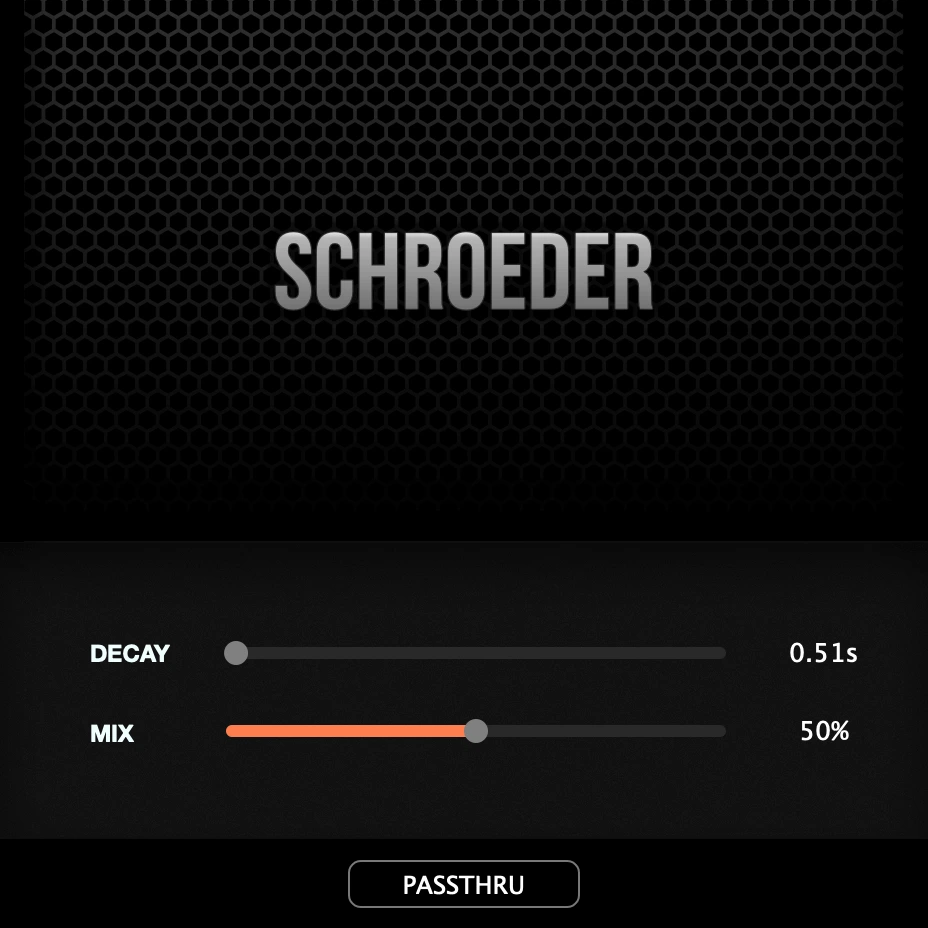
Schroeder is a reverb plugin built on the original 1962 Schroeder algorithm, the one every digital reverb descends from. It is part of the discoDSP FX Bundle and also available for iOS as an AUv3.
Version 3.0 is rewritten from the ground up: seven reverb spaces, four variations, three knobs and per-channel spectrum displays, with surround support on mono, stereo, 5.1, 7.1 and 7.1.2 layouts. Schroeder 1.x and 2.x sessions migrate automatically.
What's New
- Seven Reverb Spaces: Schroeder (1962 design, four combs and two allpasses), Spring (three dispersive delay loops with saturation), Booth, Room and Stage (plate reverb from tight to wide), and Hall and Cathedral (8-line feedback delay network). Wet level is matched across all spaces and switching crossfades the tail.
- Four Variations: Normal, Dark (shorter HF decay), Bright (longer HF decay) and Chorale (three-voice ensemble chorus on the wet path). The dry signal is never touched.
- Tempo-Synced Pre-Delay: Manual range 0.01 to 250 ms, or synced to tempo via the knob right-click menu from 1/64 to 1/2 with dotted and triplet divisions.
- Freeze: 100% Decay freezes the reverb tail with the input still open at -12 dB for soft-clipped reverb sustain.
- Per-Channel Spectrum Displays: The amber LCD shows Space and Variation selectors with real-time FFT analysis, one curve per channel, fed from every input including surround channels.
- Surround Support: Mono, stereo, 5.1, 7.1 and 7.1.2 spatial audio layouts with all displays updated from every channel.
- Session Migration: Schroeder 1.x and 2.x plugin states load as before. Mix and Decay are mapped onto the new engine automatically.
Schroeder 3.0 ships with discoDSP FX Bundle 3.13, which also brings Scope 3.2 with Split View on the Spectrum and Semaphore pages, per-channel curve overlays and a Channels submenu to hide rows on surround inputs. The update is free for all FX Bundle customers.
September 1, 2026
Vertigo 5.4, Bliss 3.22, Discovery Pro 9.2
Version 5.4 adds three per-voice LFOs, MPE support and a Keep Section that holds modulation, controller and effects setups across program changes.
What's New
- LFOs: Three per-voice LFOs, reached from the LFOS button on the envelope page. Waveforms cover sine, wander, triangle, saw, reverse saw, square and random, plus a custom shape drawn on the envelope canvas. Rate reads in Hz when free running and as a tempo division when synced, with delay, fade in and retrigger per LFO. Nine routing slots each pair a destination with a bipolar amount, covering pitch, fine tune, both filters, morph, stretch, amplitude, pan, the formant filter and the rate or depth of another LFO. A playhead dot rides each waveform preview, and eighteen zone plus eight global factory presets cover vibrato, tremolo, filter motion, panning, morph, sample and hold, formants and stretch.
- MPE: A dedicated MPE page, opened from the MPE plate in PLAY SETTINGS. Notes on member channels are routed per channel, so bend, pressure and slide act on one note at a time. Three expression axes (bend, CC 74 and pressure), each with a destination, amount, response curve, range and smoothing time. Per-note bend range with a quick picker, a poly aftertouch mode that feeds the Z axis from a normal keyboard, and MPE Configuration RPN recognition so a controller that announces itself sets the zone and bend range on its own. Six factory presets included.
- Keep Section: LFOs, MPE and the effect chain can each be held across program changes, so a modulation setup, a controller setup or an effects chain stays put while browsing sounds.
- Automation: New host parameters for each LFO on, rate and depth, and for the three MPE axis ranges, added after the existing ones so current automation lanes are unaffected.
- Interface: Page backgrounds, hovers and control drags now repaint only the area that changed, and spectral partial bars are drawn in batches, cutting the paint work of a hovered page by around twenty times. New artwork for the LFOS and MPE controls, and refreshed operator, spectral and formant page graphics.
- Presets: Program format extended for the modulation data, with reserved room for future additions. Older presets and saved sessions load as before.
This update is free for all Vertigo 5.x customers.
Version 3.22 imports third-party sampler formats through ConvertWithMoss and opens projects saved with Bliss 1 and Bliss 2.
What's New
- ConvertWithMoss Import: DLS, MPC, Korg, Kurzweil, EMU, Yamaha and other formats are converted with the ConvertWithMoss command line tool and loaded as a bank. Multi-program files become one bank, kept in the Instrument Library > Converted folder for later recall (macOS, Windows and Linux).
- Converter Installer: An Install ConvertWithMoss menu item downloads the converter (code signed and notarized on macOS), shows progress on the program LCD and skips the transfer when the installed build is already current. Importing a format Bliss cannot read offers the download instead of a web page.
- Legacy Project Compatibility: Projects saved with Bliss 1 and Bliss 2 now open with Bliss 3. VST3 reports the old plugin IDs as compatible, and the installer offers a Bliss AU Legacy option that registers the Bliss 1 and Bliss 2 AU IDs.
- Standalone: Audio Settings added to the main menu, replacing the Settings button in the title bar (Windows, Linux).
This update is free for all Bliss 2.x and 3.x customers.
Version 9.2 plays Bliss and Corona wave banks straight from disk, imports banks by drag and drop, and adds HDR support on Windows.
What's New
- Bliss Wave Banks: Bliss presets and banks (ZBP and ZBB) load as wave banks from your Bliss Instrument Library, listed under a Bliss submenu. The keymap comes across (samples, key range, root key, tuning, gain, loops), while filters, envelopes, LFOs and effects stay in the Discovery layer. Sliced instruments map one slice per key.
- Corona Wave Banks: Corona wave banks are scanned from Corona's own Waves folder and listed under a Corona submenu, so the same library serves both plugins with no copies. The submenu only shows if the product is installed.
- Drag and Drop Import: Drop .sfz, .sf2, .zbp, .zbb and .dwb files onto the plugin to import them. The menu entry is now Import Wave Bank... and covers every bank type.
- HDR Glow on Windows: LEDs and displays glow beyond white on HDR monitors, as on macOS.
- Improvements: New Copy Bliss, SF2, SFZ import setting plays banks that already sit in a scanned library where they are instead of duplicating them. SFZ banks read .flac samples, and an import with missing samples is cancelled with the missing files listed instead of leaving silent zones. Bliss banks load on a background thread with a Loading... indicator, and big LCD digits line up between the standard and HDR artwork at any GUI size.
- Bug Fixes: Fixed window sizing at 125%, 150% and 175% Windows and Linux display scaling, where controls overflowed a too small window. The first program change after loading a project is no longer dropped.
This update is free for all 9.x and 8.x customers.


